
1. Importing a card
On your PC :
Preliminary steps before importing on the console :
- You can import your recommendation card via usb key or by email by logging into your Gmail account on your Android tablet.
- If you wish to modulate your inputs on several plots over the same period, it is possible to combine several modulation maps.
- To do this, download your different modulation cards from the platform, for each of them done : right click, extract here
(The decompression software used in this example is Winrar. The windows explorer also offers a less complete decompression service.)

- Once all your modulation maps extracted, select the different folders extracted then right click, add to the archive...

- Name the archive in order to find it easily, and check the ZIP archive format.

On your console:
- Insert the USB stick into the appropriate port.
- Open the Calibrator Bogballe application

- Click on dose modulation, shape file
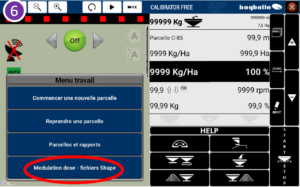
- Navigate to select the application map loaded in the console

- Click on "import ZIP file".

- Before leaving for the field, check that the parcel files are imported.

- Click on back

- Go to the field, the map will only appear when the tractor is geolocated in the field.

Your console is ready to modulate automatically






