USB Key Transfer
Before you start, make sure that the Job Controller is active and that the selected exchange media is "USB memory stick". see part 3
1. Importing a task
On your PC :
- Upload your task from the platform
- Insert on the key
- Extract the TASKDATA folder from the .zip file, to do so, open the .zip file and move the TASKDATA folder to your USB flash drive.

- Delete the zip file

- Unplug your USB flash drive
On your console:
- Insert the USB flash drive into the appropriate port.
- A pop-up window appears
- Click on the " import " tab then " USB - Taskdata (xml) ".
- Select the task(s) and click on "IMPORT", then remove the USB flash drive.

- Click on the "File" tab at the top right of the main menu.

- Click on the box to the right of the symbol


- Select the desired task from the list

- Check the information. To change the information, click


- Start the task by clicking on
 . To pause the task, click
 . To pause the task, click
2. Export of tasks
- Click on the "File" tab at the top right of the main menu.

- Stop the task by clicking on the task by clicking on



- Insert the USB key
- A pop-up window appears

- Select the "Export" menu, then "SmartTouch - completed tasks".
- Then select the desired task(s) and click on "EXPORT".
- Removing the USB flash drive
3. Miscellaneous settings
Manage the Task Controller (TC) and the Universal Terminal (UT)
- Click on the tab


- Then check that the "ISOBUS UT" and "TC" boxes are enabled, as shown below

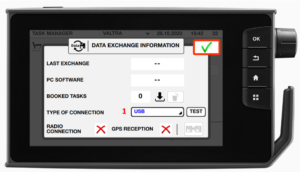
Change interface exchange (USB / TaskDoc pro)
- Click on the "Files" tab at the top right of the main menu.

- Click on the icon at the bottom right, as below :

- Finally, select the data source (1), here "USB".
- Then click on " Validate "